
Voice assistant for Omarchy and macOS
Press and say what you want.
Auren opens apps, plays music, messages your friends and starts coding agents. When an app has no command for something, it looks at the screen and uses the mouse and keyboard. A small robot on your desktop shows what it's doing and answers out loud.
$ yay -S auren && auren$ brew install kvm404/auren/auren && auren setupClick the keys, or press A, to hear the next request.
See it work
Opening apps, playing music, sending a message, drawing in Excalidraw and starting Codex, all by voice.
Things to say to it
Plain requests, the way you'd ask someone sitting next to you. Auren works out the steps.
Open Obsidian on workspace 2.
Switches to workspace 2 and opens Obsidian there.Play some lofi on Spotify.
Finds a lofi playlist and starts it.Draw how login works in Excalidraw.
Opens Excalidraw and draws the diagram with the mouse.Find the cheapest flight to Goa next Friday.
Searches in your own logged-in browser and reads you the answer.Ask Codex to fix the failing tests in my project.
Starts Codex in a herdr tab, inside that project.Tell Priya I'm running late.
Types the message in WhatsApp and asks you before it sends.
What's inside the robot
Auren is a small program on your machine that connects tools you probably already use. You don't need a new account, only a key for speech to text.
Ears AssemblyAI
Turns your voice into text, and only while you're talking. You bring the API key.
Brain Claude Code or Codex
Your signed-in Claude Code on Claude Haiku, with Codex as the backup. No extra API key.
~2 s for a simple answer. Haiku is quick because Auren's tools do the heavy lifting.
Voice Phonon, on your CPU
Gradium's Phonon speaks in four voices, generated on your own processor. The voice model is about 100 MB.
Hands Commands first, then the mouse
Apps, windows, workspaces, music and settings have direct commands. For anything else Auren takes a screenshot and clicks and types.
Browser tools optional
With Open Browser Use, Auren works inside your real, logged-in Chromium browser. It clicks and types like a person, so it can write in Google Docs, Notion, Gmail, X, Slack and WhatsApp Web.
Coding agents optional
With herdr, Auren starts Claude Code or Codex in their own tabs, with the model and effort you asked for, and tells you when they're done.
It asks before anything you can't take back.
Every action Auren takes has a kind. Reading, opening apps and looking at the screen never ask. Closing windows, deleting files and sending messages ask depending on the level you choose.
Publishing, buying, running as root, touching secrets and wiping a disk ask every time, at every level except Full access. A yes never carries over to the next one.
These checks catch mistakes, mishearings and instructions hidden in web pages. They are not a sandbox. Read how safety works.
The default. Every risky action asks first.
Talk to your PC from your phone
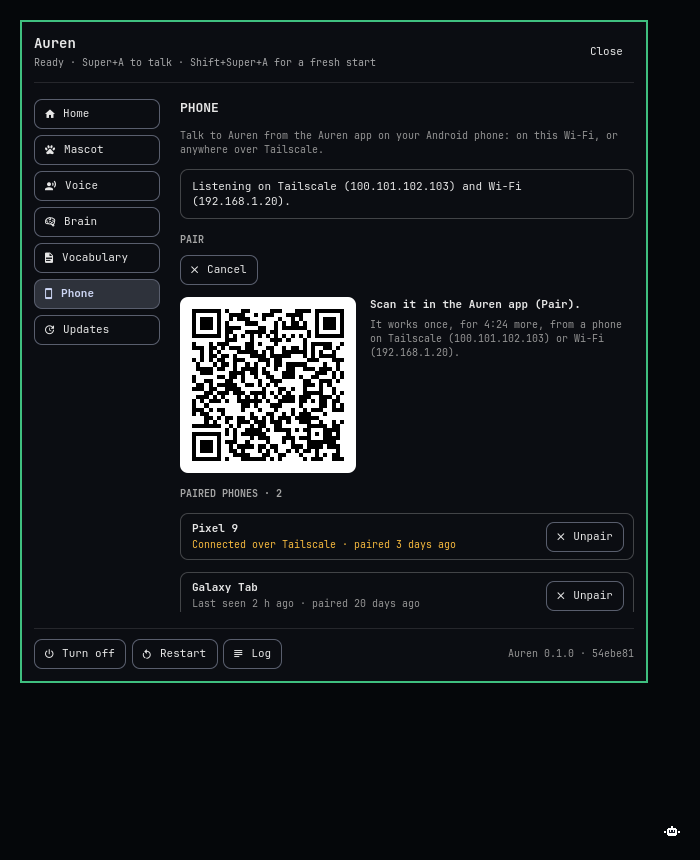
The Auren app for Android talks to the Auren on your desk. The phone listens and shows the chat. The PC does the work, with the same brain, tools and safety level as at the desk.
On the same Wi-Fi it just works. Put Tailscale on both and it works from anywhere, moving between the two by itself. It works with Omarchy and with a Mac.
- Get the app. Open the Phone page in the bar panel (on a Mac, the menu bar icon, then Phone…), click Get the app and scan the QR code with your phone's camera.
- Pair. On the same page, click Pair a phone.
- Scan. In the app, tap Pair and scan the code. You never pair again, even when Tailscale comes and goes.
- Hold to talk, or turn on Hands-free for a conversation that keeps listening, even with the screen off.
- Type a request instead, and stop Auren from either side.
- Answer yes or no by tapping or by voice.
- The inbox keeps the links, text, images and files Auren sends you.
- The same voice as the PC reads replies aloud, generated on the phone's own CPU.
Two companions, every mood
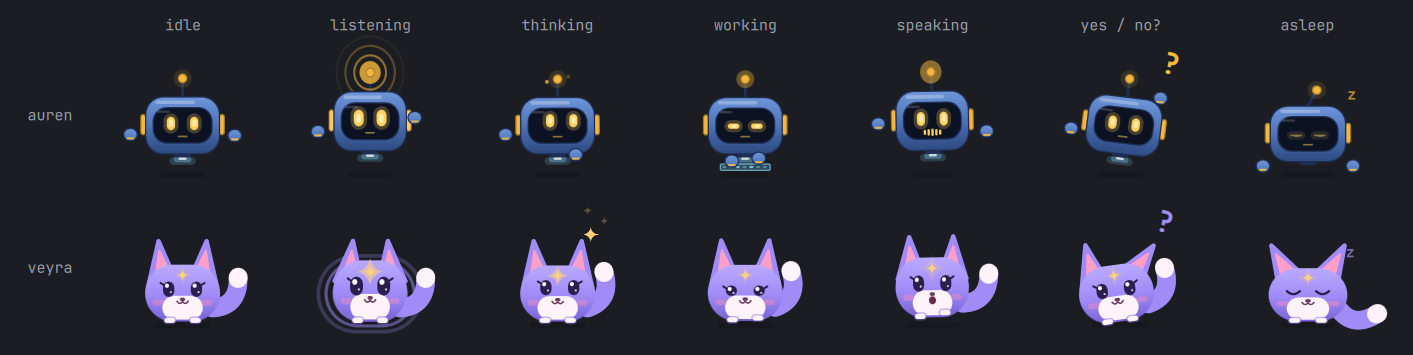
Auren is a cobalt hover-bot with gold LED eyes. Veyra is a lavender fox spirit with a star on her forehead. Each has a pose for listening, thinking, working, speaking, asking and sleeping. Click to talk, drag to move, scroll to resize.
Install
On both systems you need Claude Code or Codex, signed in, and an AssemblyAI API key for speech to text.
Omarchy with Hyprland 0.56 or newer. Auren is in the AUR.
$ yay -S auren
$ auren- The first
aurenasks all its questions up front: which keys start Auren, whether to set up the browser tools, and your AssemblyAI key. - It adds the keys to
~/.config/hypr/bindings.lua, after saving a backup. The rest of your Hyprland config stays as it is. - It adds the bar plugin, downloads the voice model, starts Auren and runs
auren doctor. - Press Super+A and talk. Updates arrive with
yay, or from the Update button in the bar panel.
An Apple Silicon Mac on macOS 14 or newer, and Homebrew.
$ brew install kvm404/auren/auren
$ auren setupauren setupbuilds Auren.app in~/Applicationsand opens its setup window.- Each step has one button: the microphone, Accessibility, Screen Recording if you want it, your AssemblyAI key and the brain. It notices on its own when you allow something, so there's nothing to restart.
- Press Control+Option+A and talk. Every setting lives in the Auren window, under the menu bar icon.
auren updateinstalls new versions. The Mac version is new, so expect rough edges and please report them.
On Omarchy, paste this into Claude Code or Codex.
Install Auren from https://github.com/kvm404/Auren on this Omarchy machine.
Follow "For coding agents" in its docs/install.md.
Ask all your questions at the start, then install everything in one go.- The agent checks your machine first without changing anything: Hyprland, PipeWire, your microphone, which brain is signed in, and what's already on Super+A.
- It asks you everything once.
- Then it installs and sets up Auren in one go.
auren doctor. It checks every part and says what to fix.Where your words go
Leaves your machine
- Your voice, to AssemblyAI, while you're talking.
- Your request and its context, to Claude or Codex. Screenshots too, when Auren needs to look.
Stays on it
- The voice you hear, made on your CPU.
- Your history, logs, settings and keys.
- Auren has no telemetry or analytics.
The full privacy notes list every destination.